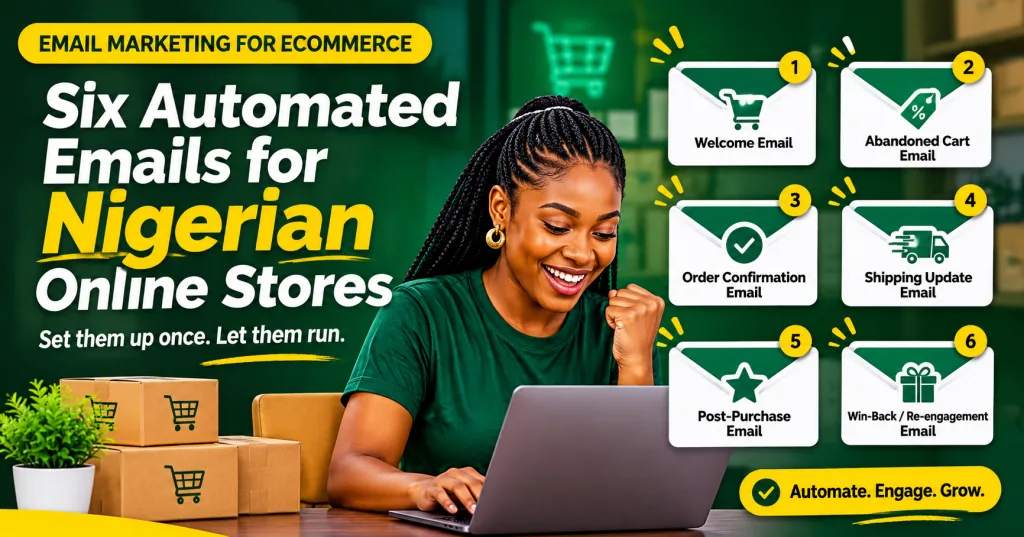


This guide is for Nigerian store owners who have an email list but only write when there is a promotion. You will get the six automated email flows that make email marketing for ecommerce work while you are busy, with the timing for every email in each flow. Once set up, they run in the background and sell for you.
Most small stores only send emails when there is a sale. Better emails answer what customers actually do: join, leave a cart, receive a parcel, go quiet. Each moment gets its own email, written once and sent automatically.
Order confirmation and delivery follow-up
A confirmation email answers one question: did my order go through? Send it straight away with the items, the total, the address, the expected delivery date and a WhatsApp number. Many Nigerian buyers have been let down before, so this email builds trust. Your emails are not only for selling. They also prove you are reliable.
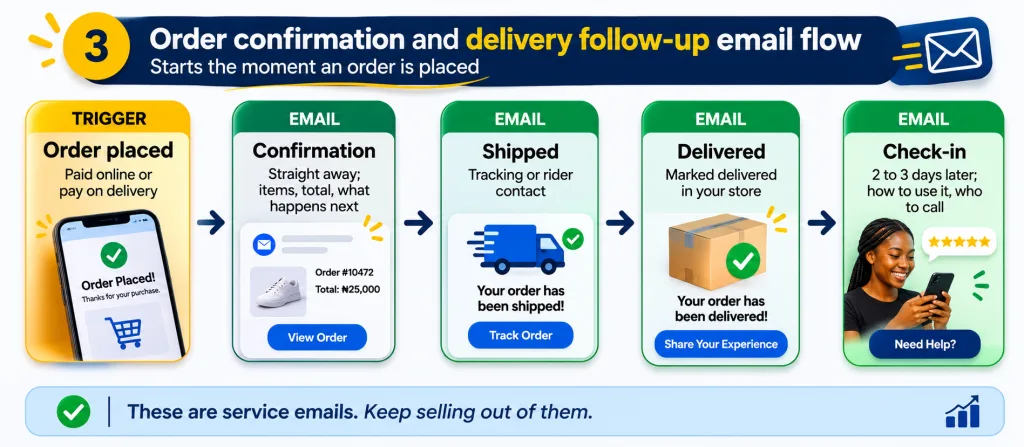
Then send a shipped email with tracking or the rider's number, and a delivered email. Two or three days later, send a check-in on how to use the product and who to call. Plain subject lines work best here, such as "Your order is on its way".
For pay on delivery orders, ask the customer to confirm the address and have the amount ready. Keep all four emails useful, not promotional, so customers still open the rest of your emails.
If a delivery is late, tell the customer before they ask. A short email with the new date and an apology costs you nothing and prevents angry messages on WhatsApp and Instagram.
Abandoned cart and abandoned checkout
Two people leave without paying. One adds an item to the cart and goes. The other enters an address and email at checkout, then stops, often at the delivery fee. The checkout person was closer to buying, so that email matters most. Ask for the email address early, because you cannot recover someone you cannot reach. Recovering these customers is one of the quickest wins you will get from email.
Send three emails. After about an hour, send a plain reminder with the product photo, the price and a button back to the cart, with a subject line such as "You left something in your cart". After about a day, answer worries about delivery, payment and returns, and say so if you offer pay on delivery. After about three days, send a short last note with a small bonus such as free delivery. Stop the sequence the moment the customer buys. Keep these emails short, because many people read on their phones.
If customers gave you their phone number at checkout and agreed to hear from you on WhatsApp, a short WhatsApp message after the second email can reach people who rarely open email.
If many people leave at the same step, fix the page too. That is part of how we build online stores, and emails work best on a store that is easy to buy from.
Welcome series: the first email and the next two
A new subscriber is as interested as they will ever be, so your emails should start at sign-up, not at your next sale.
Send the first email straight away. Thank them, say who you are, set expectations and link to your best seller. Put any promised gift here.
Send the second about two days later, to remove doubts: how to order, payment options and delivery times to Lagos and other states. Send the third about five days after sign-up, with real customer reviews and one reason to order this week. Three emails is the right pace for a small list. Do not send all three on the same day, because spacing them out gives each email its own chance to be read.
Add a clear unsubscribe link, because Gmail's sender guidelines expect it, and fewer spam reports mean fewer emails that land in spam.
Review request after delivery, not after payment
Asking for a review after payment is too early, because the customer has no product to judge and delivery can take days. Start the clock when the order is marked delivered, and send the request about a week later. For fast-use items such as food or cosmetics, a few days is enough. The reviews you collect also give you proof to show new subscribers in your welcome series.
Keep it to one click: a star rating first, then a short comment. A subject line such as "How is your new order?" is enough. Send one reminder about five days later, then stop. Answer any complaint personally before it becomes a public review.
WooCommerce has a built-in review request email, still in beta and switched off by default. Turn on Customer review request under WooCommerce, Settings, Advanced, Features, then enable the Review request email under WooCommerce, Settings, Emails. It sends after an order is marked completed, so mark orders completed only once they are delivered. Whichever tool you use, build reviews into your emails from the start. For more ideas, read our guide on getting more reviews from Nigerian customers.
Win-back for customers who have gone quiet
A customer has gone quiet when they have not bought for longer than usual. For cosmetics, 90 days is a fair start. For food and other items people reorder often, try 30 to 45 days. For yearly purchases, wait longer. Win-back emails earn back customers you already paid to attract.
Send three emails. First, say you miss them and show what is new. About ten days later, give a reason to return, such as early access or a small bonus. About two weeks after that, say you will send less unless they want to stay. Each should feel like a normal email, not a desperate plea.
Check your own records first. Look at how long your best customers usually wait between orders, and set the win-back trigger a little after that gap.
Anyone who ignores all three goes to a quiet list that gets only big announcements. Our guide on how to win back customers who stopped buying goes further.
Birthday or anniversary email, and what to offer
Let the system remember birthdays. Collect the day and month on your sign-up form or account page. A birthday is personal data, so ask plainly, explain why, and follow Nigeria's data protection rules. If you have no date, send an anniversary email a year after the first order. A personal touch like this makes your store stand out.
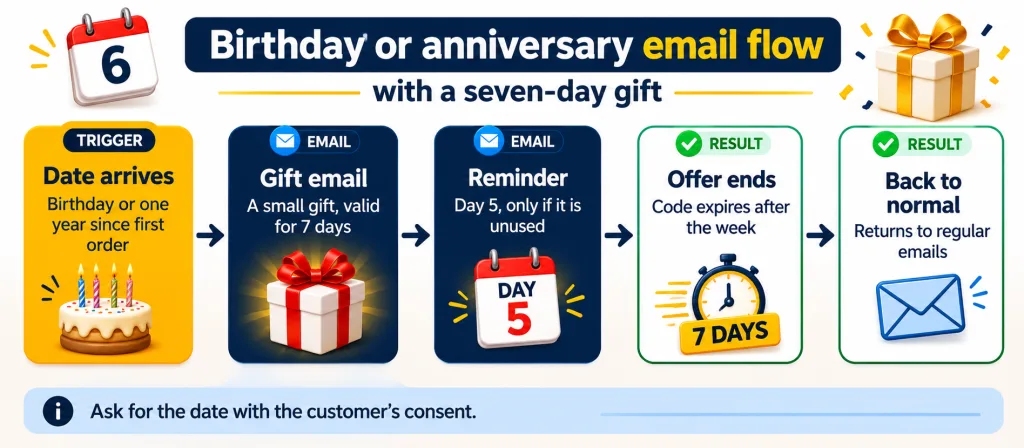
Send it about three days before the date and make the gift valid for seven days, so it covers the birthday itself. Keep the offer small: free delivery, a free small item or early access. Send one reminder on day five. A small gift does not teach customers to wait for sales, and it is one of the friendliest emails you can send.
Setting up email marketing for ecommerce in Shopify, WooCommerce or Selar
Build each flow once, test it, and leave it running.
Shopify has order and abandoned checkout emails built in, so edit those first. Its own email tool, found under Marketing in the Shopify admin, also has ready-made automations for welcome, abandoned cart and win-back emails, so many small stores need no extra app. Add one only if you need a flow it does not cover.
WooCommerce sends order emails by default, and you can edit them under WooCommerce, Settings, Emails. Abandoned cart, welcome, win-back and birthday emails usually need an extension or an email tool such as Brevo, Mailchimp, Klaviyo or Omnisend to complete the set.
On Selar, check which automated emails your plan covers and use a separate tool for the rest. Few platforms handle everything alone.
Send from an address on your own domain, not a free Gmail address, because people trust a sender that carries your store's name. Then set up in this order: order confirmation, abandoned checkout, welcome series, review request, win-back, birthday. Test each by placing an order and reading every email on your phone, because most emails are read on mobile. Then check the results once a month: how many people open, click and buy from each email. Fix the weakest one first.
If you would rather not build all six yourself, our CRM setup and email marketing service builds them for you. You can also get our free audit, and we will show which of the six your store is missing.
Frequently asked questions
What is email marketing for ecommerce?
Email marketing for ecommerce means sending emails that support online sales, from order confirmations and cart reminders to reviews and promotions. The most useful emails are automated, so they send themselves when a customer does something, such as leaving a cart or receiving a parcel.
Which automated email flow should I set up first?
Start with the order confirmation, because customers expect it and it builds trust at once. Add the abandoned checkout email next, since it speaks to people who were ready to pay. Then build the other flows: welcome, review request, win-back and birthday.
How many emails should I send after an abandoned cart?
Three is enough for most stores: a reminder after about an hour, an email answering common worries after a day, and a last note after about three days. Stop the sequence the moment the customer buys. More than three reminders risks annoying people.
When should I ask Nigerian customers for a review?
Send it about a week after the order is marked delivered, not after payment. Delivery can take days, and customers cannot judge a product they have not received. For fast-use items such as food or cosmetics, a few days is enough. One reminder is enough.
Do automated marketing emails need an unsubscribe link?
Yes. Every promotional email, including welcome, win-back and birthday emails, should carry a clearly visible unsubscribe link, and Gmail's sender guidelines ask for one. Order confirmations and delivery updates are service emails, so they do not need one, though adding a link does no harm.
Does email marketing for ecommerce work with a small list?
Yes, and automation helps most when your list is small, because every subscriber counts. A welcome series, an abandoned checkout email and a review request need no large list to start paying back, because they run on customer actions, not on list size.