


If your invoices, quotes, newsletters, or other business emails keep disappearing into spam, this guide is for you. If you're asking why my emails go to spam, the answer can involve your email address, domain setup, sender reputation, recipient behaviour and Gmail or Yahoo's sending rules.
For a business, email problems can become expensive quickly. A quotation sitting unread in spam can mean a lost customer. An invoice that never arrives can delay payment. A newsletter that misses the inbox can also waste the time and money spent creating it.
The good news is that many email deliverability problems can be fixed without becoming an email expert. You just need to know what to check.
Why my emails go to spam
There are several reasons an email can end up in spam. Understanding why my emails go to spam usually starts with technical setup, sender reputation and recipient behaviour.
Your emails may be more likely to land in spam if:
- You're sending from a free Gmail or Yahoo address for business purposes.
- Your business domain doesn't have SPF, DKIM or DMARC properly configured.
- People frequently mark your emails as spam.
- You're emailing old, inactive or purchased contacts.
- You suddenly send a large number of emails from a new address or domain.
- Your emails don't give subscribers an easy way to unsubscribe.
- Your sending domain has developed a poor reputation.
- Your email provider can't verify that you're authorised to send from your domain.
- Your messages contain broken links, misleading subject lines or unexpected attachments.
Start with this troubleshooting checklist
If you're trying to understand why my emails go to spam, check these areas before changing everything at once:
- Check your domain. Make sure your From address uses a domain you own and that the domain is active.
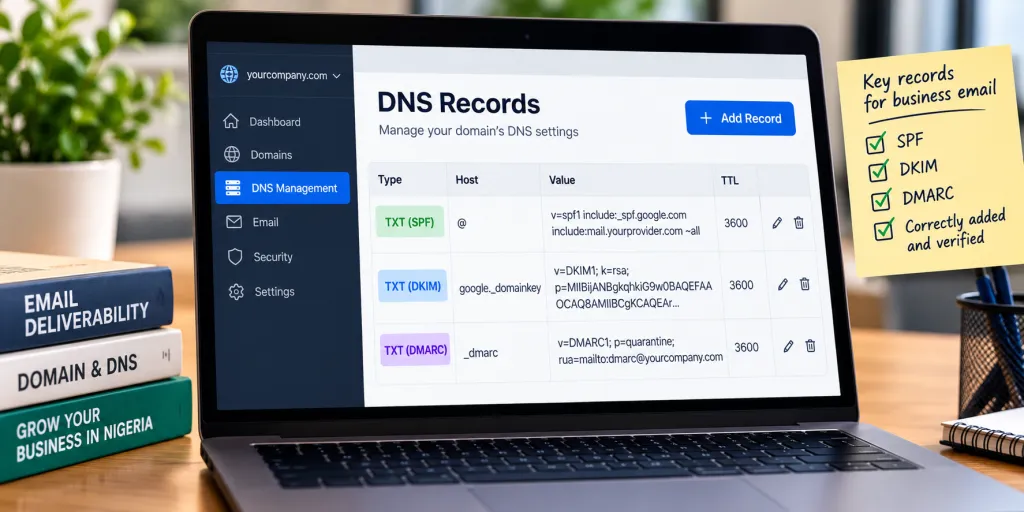
- Check SPF. Confirm that your DNS has a valid SPF record listing the services authorised to send email for your domain.
- Check DKIM. Make sure your email provider is signing outgoing messages and that its DKIM record is published correctly.
- Check DMARC. Confirm that a DMARC record exists and that the authenticated domain aligns with the address shown in the From field.
- Check your list. Remove invalid, bounced and purchased contacts.
- Check your sending behaviour. Look for sudden increases in volume or unusually high complaint rates.
- Check the message. Review links, attachments, subject lines and formatting.
- Read bounce messages. If an email was rejected, the error message often tells you more than the email itself.
SPF, DKIM and DMARC explained simply
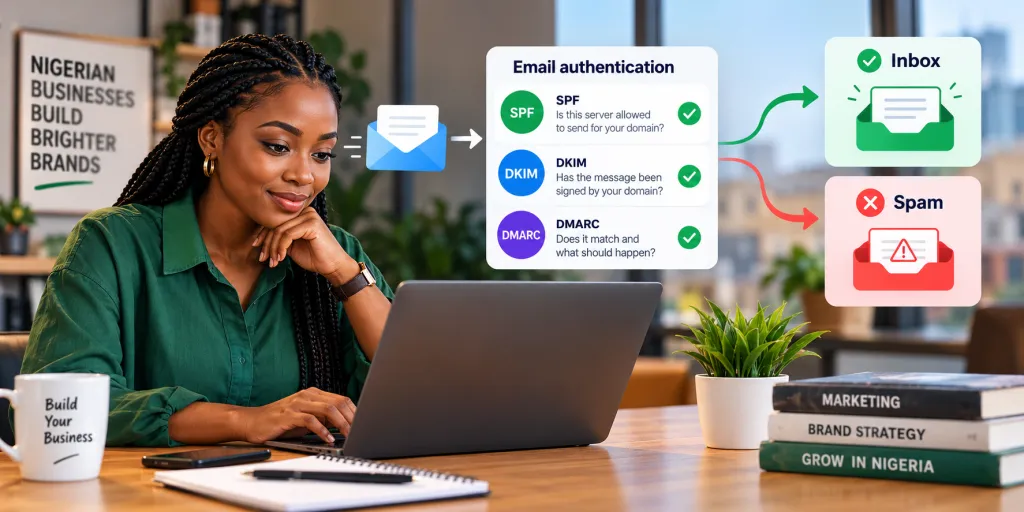
SPF, DKIM and DMARC sound complicated, but their jobs are straightforward.
SPF asks: “Is this server allowed to send email for this domain?” SPF, or Sender Policy Framework, is a DNS record listing the email services authorised to send on behalf of your domain. Your domain should normally have one SPF record containing all legitimate sending services.
DKIM asks: “Was this message authorised by the domain?” DKIM, or DomainKeys Identified Mail, adds a digital signature to outgoing emails. The receiving provider checks that signature against a public key published in your DNS.
DMARC asks: “What should happen if authentication fails?” DMARC, or Domain-based Message Authentication, Reporting and Conformance, works with SPF and DKIM. It checks whether the authenticated domain matches the domain shown in the From address and lets you tell receiving providers how to handle failures.
A DMARC policy can tell providers to monitor suspicious messages, send them to spam or reject them. It can also provide reports showing which services are sending email using your domain.
How this applies to Nigerian businesses
If you're using Hostinger, cPanel, Zoho Mail or Google Workspace, you'll usually manage these settings through your email provider and your domain's DNS settings.
With Hostinger, check your DNS Zone Editor and authentication instructions. With cPanel, Email Deliverability can show whether SPF and DKIM records are missing or incorrectly configured. With Zoho Mail, check the domain authentication settings in the Admin Console. With Google Workspace, generate the DKIM record through the Admin console, publish it in DNS and start authentication.
The important part is consistency. Your DNS records should reflect the actual services sending email for your domain. Don't add records for services you don't use.
For businesses that need help managing email and customer communications, the CRM & Email Marketing service can support this wider process.
Gmail and Yahoo's rules for senders
Gmail and Yahoo use automated systems to filter unwanted email. Their requirements become especially important as sending volume increases.
Google requires senders to personal Gmail accounts to authenticate email with SPF or DKIM. Senders of more than 5,000 messages per day to personal Gmail accounts must use both SPF and DKIM, publish DMARC and meet additional requirements, including one-click unsubscribe for digital marketing and subscribed messages.
Google recommends keeping spam rates below 0.10% and avoiding 0.30% or higher. Yahoo similarly requires bulk senders to use SPF and DKIM, publish a valid DMARC policy, provide easy unsubscribe for marketing messages and keep spam complaint rates below 0.3%.
For current requirements, check Google's Email sender guidelines and Yahoo's Sender Best Practices.
If you're researching why my emails go to spam, these requirements are particularly relevant when your business sends newsletters or other high-volume campaigns.
Make unsubscribing easy
If someone no longer wants your newsletter, give them a straightforward way to leave.
A difficult unsubscribe process can encourage people to mark your email as spam instead. For digital marketing and subscription emails, Gmail requires bulk senders to support one-click unsubscribe, while Yahoo has similar requirements for bulk email marketing messages.
Google recommends processing unsubscribe requests within 48 hours, while Yahoo specifies two days. Purchased lists are also risky because they can contain outdated addresses or people who never agreed to receive your messages.
A smaller list of engaged subscribers is more useful than a large list that generates complaints and bounces.
Test your setup before sending
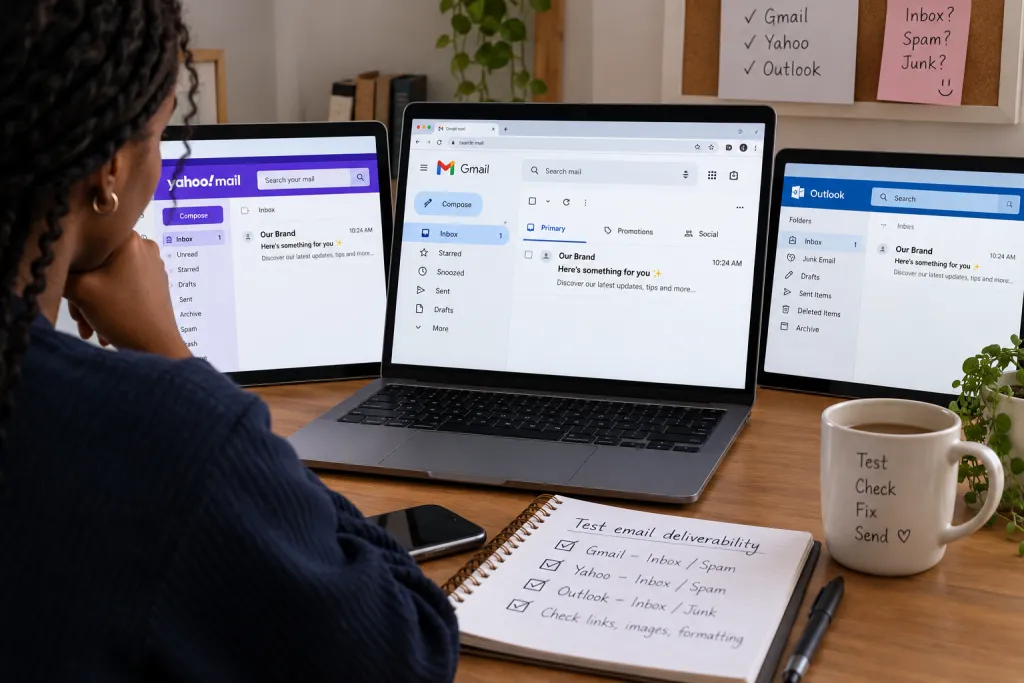
Before sending a large campaign, test the email and your authentication setup. Testing is one of the simplest ways to investigate why my emails go to spam before the problem affects your whole mailing list.
Send test messages to Gmail, Yahoo and another business mailbox you can access. Check whether the message arrives, whether it goes to the inbox or spam, whether the sender name and address are correct, whether links and images work, whether the unsubscribe link works, and whether SPF, DKIM and DMARC pass.
If you use Google Workspace, Google's Postmaster Tools can provide information about spam reports, authentication and domain or IP reputation for eligible traffic.
What to do when emails are rejected
Spam placement and rejection are different problems. If an email reaches spam, the receiving provider accepted it but placed it away from the inbox. If it is rejected, the provider refused to accept it, often with a bounce message or SMTP error.
Start by saving the complete bounce message. Look for the provider's reason, such as an SPF or DKIM failure, DMARC rejection, invalid recipient, blocked IP address or sender reputation problem.
Then check your authentication records, review recent sending activity and remove invalid or repeatedly bouncing addresses. Don't immediately switch to another domain or email service. First identify what caused the rejection.
What Nigerian businesses should check first
If you're running a business in Nigeria and your emails aren't reaching customers, start with your existing setup. If you're still wondering why my emails go to spam after checking the message itself, look at your domain and sending history.
Check your domain and email authentication settings. Review SPF, DKIM and DMARC. Then look at your sending behaviour. Are your email marketing contacts opted in? Are old addresses bouncing? Are people marking your emails as spam? Have you recently increased your sending volume?
These questions can help identify whether the problem is technical, behavioural or related to sender reputation.
If you need help with the wider marketing side of your business, you can explore the Digital Marketing service, review Kosher Lead's full range of services, or book a consultation to discuss your setup.
Frequently asked questions
Why do my emails go to spam even when SPF, DKIM and DMARC are set up?
If you're still asking why my emails go to spam after setting up SPF, DKIM and DMARC, remember that authentication is only one part of email deliverability. Mailbox providers also consider sender reputation, spam complaints, recipient behaviour and sending patterns.
Can using Gmail or Yahoo make my business emails go to spam?
Not automatically. However, a custom business domain gives you more control over authentication and creates a clearer business identity. For business communication, an address such as "hello@yourcompany.com" is generally preferable to a free personal mailbox.
How do I stop my newsletter from going to spam?
Start with authentication, then review your list and sending behaviour. Send only to people who opted in, remove invalid contacts, keep complaints low, make unsubscribing easy, and increase sending volume gradually; also make sure your SPF, DKIM and DMARC records are set. These steps address many of the common reasons why my emails go to spam.
How long does it take to fix email deliverability?
Technical problems can sometimes be corrected quickly once the underlying DNS or email configuration is fixed. Reputation problems can take longer because mailbox providers need to see consistent improvement in your sending behaviour.
Should I buy an email list?
Purchased lists can contain outdated addresses and people who never agreed to receive your messages. This can increase bounces and spam complaints. Build your list through genuine opt-ins instead. A smaller audience that wants your emails is more valuable than a large audience that doesn't.
[INSERT PICTURE 4] What to show: Nigerian business owner reviewing an email deliverability checklist covering authentication, list quality, unsubscribe options and sending volume. File name: email-deliverability-checklist-nigeria.jpg. Alt text: "email deliverability checklist for Nigerian businesses". Caption: A simple checklist can help Nigerian businesses troubleshoot common email delivery problems.
The bottom line
If you're wondering why my emails go to spam, start with the basics.
Use a properly configured business domain. Set up SPF, DKIM and DMARC. Keep your email list clean. Send to people who have opted in. Make unsubscribing easy. Increase your sending volume gradually and monitor complaints and delivery problems.
Email deliverability has a technical side, but the main goal is straightforward: make it easy for email providers to verify who you are and make it clear that your recipients want your messages.
For Nigerian businesses, getting these foundations right can make everyday communication more reliable, whether you're sending an invoice to one customer or a newsletter to thousands of subscribers. If you're planning broader digital marketing work, you can also request a quote or explore the company's blog for more practical guides.